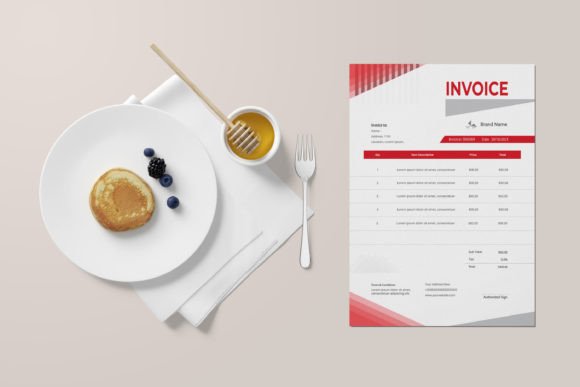
Streamline Your Workflow with the Invoice Template
For freelancers, small business owners, and creative professionals, the gap between finishing a project and getting paid can feel like a chasm. Administrative tasks, particularly creating professional invoices, often fall to the bottom of the priority list. This is where a practical, well-designed asset becomes invaluable. The Invoice template is built to bridge that gap, offering a straightforward solution to list, count, and itemize every piece of work on any project. It’s a tool designed for clarity and efficiency, ensuring you can send a polished invoice and receive payment from your clients without unnecessary hassle.
A Design Asset Built for Practicality and Professionalism
At its core, the Invoice template is a premium design asset focused on real-world utility. Its visual personality is clean, organized, and professional—exactly what you need when communicating financial details. The style avoids unnecessary ornamentation, prioritizing a clear visual hierarchy that guides the client's eye from the project summary to the final total. This modern typography approach ensures readability and conveys competence, which directly influences how your brand is perceived. A well-structured invoice reinforces your professionalism and can even strengthen brand identity through consistent presentation.
This template’s appeal lies in its adaptability. While it functions perfectly as a standard billing document, its design principles are rooted in good editorial design. The layout considers spacing, alignment, and weight to create a document that is both easy to fill out and pleasant to review. For a designer or marketer, using a template that respects these principles is a small but significant detail that reflects on your overall work quality.
Where This Template Shines: From Client Projects to Personal Use
The true value of any design asset is measured by its application across various scenarios. This Invoice template is engineered for versatility. For entrepreneurs and small business owners, it’s the backbone of client management. You can customize it for packaging design projects, web design retainers, or content creation packages. Bloggers and publishers will find it equally useful for invoicing advertising partners or affiliate collaborations.
Beyond commercial use, its utility extends to personal projects. A crafter selling goods on a marketplace can use it to generate professional receipts. A hobbyist taking on a commissioned piece can present a clear agreement on deliverables and costs. The template’s clean structure makes it adaptable for any situation where a clear record of services or items rendered is needed. It’s a fundamental tool for anyone who needs to move from creative work to financial transaction seamlessly.
Key Features That Empower Your Business
This isn’t just a static PDF. The Invoice template is a fully editable and customizable file, giving you complete control. Here’s what makes it a practical addition to your toolkit:
- Full Customization: Edit every element in Adobe Illustrator, Adobe Photoshop, or Microsoft Word. Change text, colors, and layout to match your brand’s style guide.
- Professional Print Quality: The A4 size with bleed and 300 DPI resolution ensures your invoice looks sharp and professional, whether printed or sent as a high-quality PDF.
- Organized and Efficient: Well-organized layers in the AI and EPS files mean you can find and edit elements quickly, saving you valuable time.
- Scalable Design: Built with vector design elements, the template can be scaled to any dimension without loss of quality, useful if you need to adapt it for different formats.
- Ready to Use: With 2 color variations and free fonts used, you can get started immediately. The print-ready file format means you’re just a few edits away from sending.
Integrating the Invoice Template into Your Workflow
Adopting a new tool is about fitting it into your existing process. Start by evaluating your current needs. Do you bill hourly or per project? The template’s layout can accommodate both. Test it with a recent project: list the items, input the costs, and see how the final document reads. Does the visual hierarchy make the information easy to digest? If not, use the editable features to adjust font sizes or spacing.
Consider your font pairing choices if you decide to customize the typeface. While the template includes recommended free fonts, you might want to use your brand’s primary typeface for headings and a clean sans serif font for body text to maintain readability. This is where understanding basic typography can enhance your brand perception. A consistent look across your logo, website, and invoices builds recognition and trust.
Remember, the goal is consistency. Save your customized version as a master template. For each new client or project, duplicate the file and update the details. This practice ensures every invoice you send is uniformly professional, reinforcing your reliability and attention to detail. It transforms the invoice from a mere request for payment into another touchpoint that reflects the quality of your work.
Final Considerations for a Seamless Experience
Before you begin, take a moment to review the included files: the AI, EPS, and JPEG. The color mode is editable, so you can switch between CMYK for print and RGB for digital PDFs as needed. Since images are not included, you’ll add your own logo or any specific branding marks, which is ideal for maintaining a unique identity.
Ultimately, this Invoice template is more than a document—it’s a system for getting paid. It handles the administrative burden with a design-first approach, allowing you to focus on the creative and strategic work that drives your business forward. By integrating a tool that is both easy to use and professionally crafted, you streamline one of the most critical parts of your workflow: turning completed projects into revenue.